KosherJava Zmanim Library 3.0.0 Released


The KosherJava Zmanim API version 3.0.0 was released on Oct 21, 2026 י׳ חשון תשפ״ז in Maven and GitHub.

This is a major release, and unlike the releases that came before it, it will break existing code. The API has moved to java.time, a number of classes and methods were renamed, and the methods that had been deprecated over the years were removed. The zmanim themselves are almost all unchanged; what changed is what they are called and what type they return. Allow some time for the upgrade, and see the full list of changes since the 2.5.0 release in GitHub.

New in Version 3.0.0

Two New Calculators

  • The MeeusCalculator implements Jean Meeus’s high-accuracy algorithm. The existing NOAACalculator, which remains the default, is based on NOAA‘s implementation of his low-accuracy algorithm.
  • The SPACalculator implements the Solar Position Algorithm. Both new calculators are more accurate and slower than the NOAA calculator, though for practical zmanim the difference is a matter of seconds.
  • The USNO-based SunTimesCalculator is now deprecated. It is less accurate than the other three and is only being kept for reference and comparison with older implementations.

Breaking Changes

  • The minimum supported JRE is now Java 11, up from Java 8. Note that the JavaDocs only generate properly under Java 21. This affects generating the documentation, not the compiled code, which continues to target Java 11.
  • The API uses java.time throughout. All zmanim return Instants rather than Dates, sha’os zmaniyos return a Duration (and null rather than Long.MIN_VALUE when not applicable), Calendar and GregorianCalendar gave way to LocalDate and ZonedDateTime, TimeZone to ZoneId, and SimpleDateFormat to DateTimeFormatter. The now obsolete com.kosherjava.util.Time class was removed.
  • The confusingly named ComplexZmanimCalendar is now the ComprehensiveZmanimCalendar.
  • Generically named methods in the ZmanimCalendar were renamed to say which opinion they calculate. The zmanim did not change, only the names: getTzais() is now getTzaisGeonim8Point5Degrees(), getAlosHashachar() is getAlos16Point1Degrees(), getSofZmanShmaMGA() is getSofZmanShmaMGA72Minutes(), and getMinchaGedola(), getMinchaKetana() and getPlagHamincha() gained a GRA suffix. Minute-based zmanim now spell out Minutes, and getChatzos() is getChatzosHayom().
  • Parsha was renamed Parshah, in the formatters as well, and the misspelled isAssurBemlacha() and getBainHasmashos() methods were corrected.
  • Deprecated methods flagged for removal are gone, among them getSofZmanShmaKolEliyahu(), the fixed local chatzos based zmanim, and the JewishCalendar tefila methods that moved to TefilaRules. The redundant GeoLocationUtils class was removed in favor of GeoLocation.
  • A few zmanim that were a drop too early were corrected. getTzaisGeonim4Point37Degrees() is now getTzaisGeonim4Point42Degrees() and getTzaisGeonim4Point61Degrees() is getTzaisGeonim4Point66Degrees(). getTzaisGeonim5Point88Degrees() was removed.
  • The getSofZman*Chametz* methods return null when it is not Erev Pesach.
  • The source is now UTF-8, so the Hebrew in the documentation and code (particularly in HebrewDateFormatter) appears properly.

Chatzos

  • getChatzosHalayla() was added, calculated as astronomical midnight rather than as halfway between sunset and sunrise or twelve hours after chatzos hayom.
  • Two settings control how chatzos is used: useAstronomicalChatzos (on by default, retaining the backwards compatibility break introduced in 2.5.0) and useAstronomicalChatzosForOtherZmanim (off by default). getChatzosAsHalfDay() returns half-day chatzos regardless of the setting.
  • The generic getHalfDayBasedZman(startOfHalfDay, endOfHalfDay, hours) replaces getFixedLocalChatzosBasedZmanim() and allows other zmanim to be based on chatzos, and getPercentOfShaahZmanisFromDegrees(degrees, sunset) simplifies percentage-of-the-day calculations.

The Sun’s Position, and the Arctic

  • Solar azimuth and elevation were fixed in the NOAACalculator, and getSolarAzimuth(Instant, GeoLocation) and getSolarElevation(Instant, GeoLocation) were added to the AstronomicalCalculator, along with getTimeAtAzimuth(azimuth) in the AstronomicalCalendar.
  • The sun’s apparent angular semi-diameter for the day is now used by default rather than a fixed radius.
  • getPolarPlagHaminchaBenIshChai() and getPolarStartOfDayTeshuvosVehanhagos() were added for latitudes where the sun does not cross the horizon, together with getSunriseOrEasternmostSolarAzimuth() and getSunsetOrWesternmostSolarAzimuth().
  • The USNO noon calculation was corrected in locations where it was sometimes twelve hours off, and getInstantFromTime() was tweaked to address issues near the dateline.

The Calendar Classes

  • JewishCalendar gained getTekufa() and getTekufaAsInstant() for the tekufos, plus and minus methods for years, months and days matching LocalDate, and a public isJewishLeapYear(int). isHavdalahRecited() was renamed isTonightMutarBemelacha(), isYomTov() now returns true for 20 Nissan, and getDaysInJewishMonth() and getLastDayOfGregorianMonth() take their parameters in year, month order.
  • HebrewDateFormatter gained formatParsha(Parshah), and getHebrewMonthList() / setHebrewMonthList(String[]), which allow overriding the default month names such as Cheshvan to Marcheshvan.
  • TefilaRules gained isMizmorLesodaRecited(), and no longer has Tachanun recited on Erev Rosh Hashana.
  • ComprehensiveZmanimCalendar gained getMisheyakir12Point85Degrees(), getSofZmanAchilasChametzMGA72MinutesZmanis() and getSofZmanBiurChametzMGA72MinutesZmanis(), and a getMinchaGedolaGreaterThan30(Instant) that works with any mincha gedola calculation.

A number of other small changes, null-handling corrections and bug fixes are in the full list of changes. I would like to thank Moshe Dicker, Elyahu Jacobi and Maor Na’im of RoyZmanim, and many others who helped with code that went into this release. I would also like to thank Eli Julian for his continued release support skills.

User Interface Update to El Al’s Zmanim App

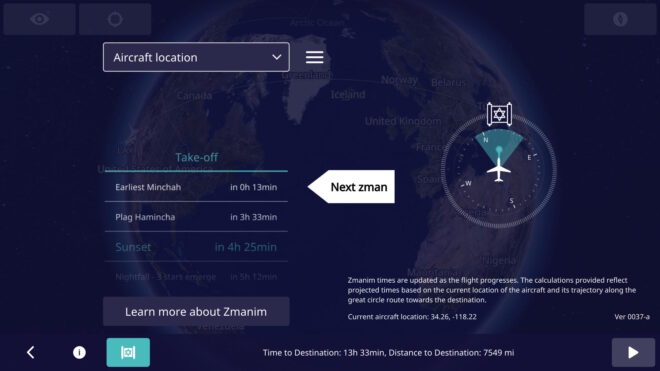
El Al’s Latest Zmanim App. Note the latitude and longitude on the display as well as the version number.
While there have been many technical updates to El Al’s in-flight zmanim app since it rolled out, none included changes to the visual user interface. In February, El Al rolled out a long awaited update by FlightPath3D to the user interface based on feedback received since the initial system was rolled out. The new UI has many enhancements including:

  • Displaying the latitude and longitude on the main screen to allow people to more easily validate the accuracy of zmanim calculations and simplify bug reporting. This feature involved a security review by El Al. To enhance reporting even further, the app version is displayed on the main screen. I am not aware of any software that shows the version on the main app screen, but we are doing what we can to help resolve any potential issues, and knowing the version number can help. Since feedback is often in the form of a picture of the screen, displaying the aircraft location and version number on the screen simplifies debugging issues.
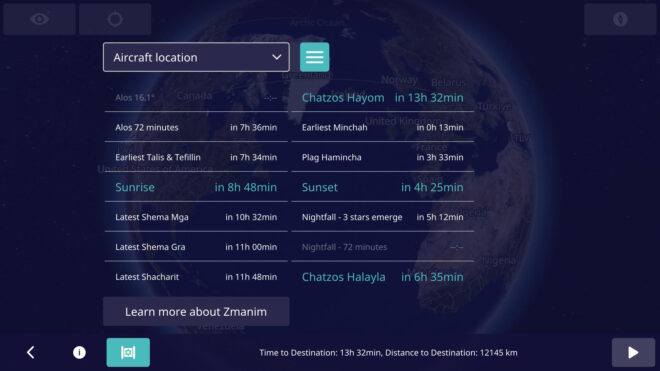
  • A UI toggle to show a more extensive list of zmanim (not just a few past and upcoming ones).
  • Avoid showing the zmanim screen before takeoff (projections on the ground are too inaccurate, since the system has no idea when it will take off). Even showing zmanim for specific cities prior to takeoff was shelved in a UX review since it would likely confuse users who would think that it reflected the flight zmanim. The icon for displaying zmanim shows up as soon as the flight is underway.
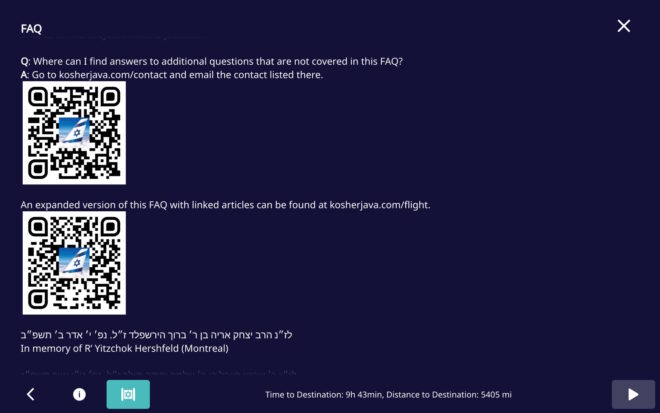
  • Minor FAQ changes, including the addition of QR codes to simplify contacting us to report issues. Thank you YCS for the suggestion.
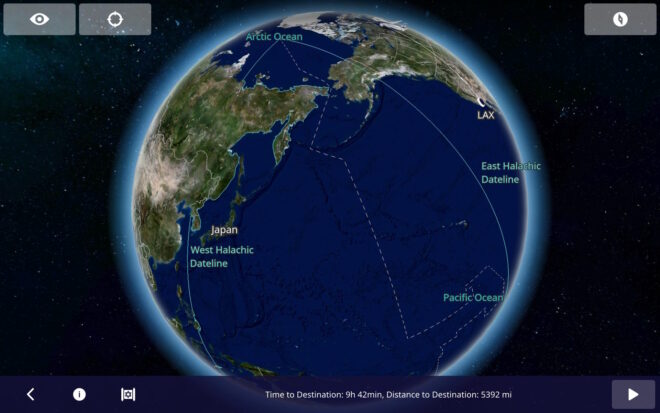
  • The Halachic Datelines (the Chazon Ish and Rav Yechiel Michel Tucazinsky) were added to the flight map. Note that graira / גרירה is used in the Chazon Ish (west) date line, but not Rav Tucazinsky’s (east) date line, since he was seemingly מסופק / unsure about concept. This change was a mapping update, and not a zmanim app update.

Time Zone Database – A Critical But Overlooked Zmanim Component

An important aspect of calculating accurate zmanim, is ensuring that the timezone information on the computer generating the zmanim is kept up to date. The volunteer maintained IANA time zone database (also known as the tz, zoneinfo or Olson database) is used globally by computers to store time zone information. Failure to keep up to date with the latest database will result in potentially generating zmanim that can be off by an hour or more in parts of the world. This time zone database is updated multiple times a year as locations around the world change their time zone information. Often changes are to the start and end of DST in various zones, but it sometimes includes year-round changes and newly introduced time zones that have rules differing from the geographic area around them. There is a general lack of awareness by zmanim software developers and system maintainers hosting zmanim apps, of the criticality of keeping this data up to date. A lack of keeping it up to date can result in the possibility of significant issues in zmanim calculations. Subscribing to the tz announcements mailing list will keep you up to date on the latest zone changes.

Timelines for Time Zone Data Updates

There are times when updates to the database are not released until after the changes take effect, and there are cases where the announcements are made very shortly before they take effect. An example of this was Lebanon’s 2023 change and reversal. On Mar 23, 2023 Lebanon announced that the DST that had been scheduled to start 2 days later on Mar 25 was being postponed to Apr 20. The IANA time zone database 2023b was released a day later on Mar 24 (2 days after the 2023a release). On Mar 27 they announced that they were moving to DST on Mar 29. On Mar 27, 2023c was released that restored an identical version to what had been released in 2023a.
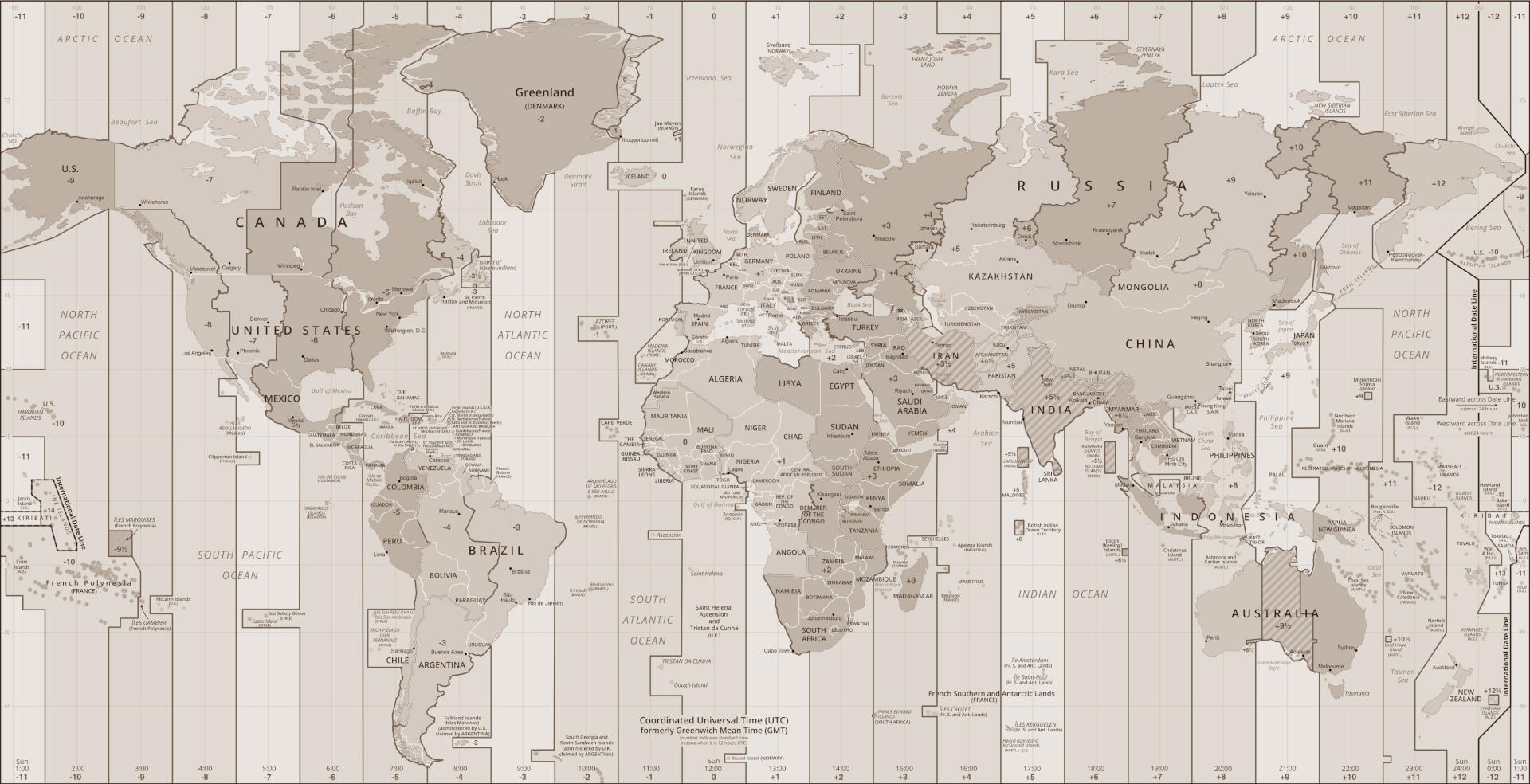
Here is a timeline from the 2024a update for Kazakhstan (that has a small Jewish community impacted by the change). The change unified time zones for the entire country (that stretches 3,000 km /1,900 mi from east to west and geographically spans 4 time zones) from two (UTC+6 and UTC+5) to one UTC+5 zone. The timeline shows that despite being on top of things, you can’t always ensure that you are up to date.

  • Oct 19, 2023 – Discussions started about a proposed change to unify Kazakhstan on a single time zone. On Nov 12, 2023 – A draft decree about the change was published.
  • Dec 7, 2023 – The Kazakh Ministry of Trade and Integration announced the proposal to formalize the changes.
  • Jan 19, 2024 – 2024 decree no. 20 was formalized by the Kazakh government and brought to the attention of the IANA Time Zone Database maintainers.
  • Feb 1, 2024 – The time zone data change was released as 2024a.
  • Feb 2, 2024 – PECL timezonedb package was released.
  • Feb 4, 2024 – Moment.js‘s Moment Timezone releases v0.5.45 with the change.
  • Feb 14, 2024 – Android Mainline PR is merged. It would be available to most Android 10 devices within 24 hours. Older Android versions will have to wait for the next release.
  • Mar 1, 2024 – At the stroke of midnight, the clocks in part of Kazakhstan rolled back to Feb 29 at 11pm, resulting in a 25 hour leap year leap day.
  • Mar 6, 2024 – Node.js code was initially updated on the main branch on Feb 15 and an issue was opened on March 1 to have a release with the updated zone information. The non-LTS version 21.7.0 with the change was released om March 6. LTS versions 20.0.12.0 and 18.20.0 with the changed were released on March 26, 26 days after it took effect.
  • Mar 26, 2024 – Windows made the first update available via the March 2024 non-security preview update (that most do not install), 26 days after the change took effect.
  • Apr 9, 2024 – General availability of the Windows patch was released, 40 days after it took effect.

Updating Operating Systems and Various Languages

Below are the basics for keeping your system’s time zone database up to date. Note that there are times when the announcements of changes do not give much warning, and it is not always possible to keep perfectly up to date on some platforms. If you have information on languages and systems not covered here, please post information in the comments section.

  • Windows – Keep your Windows Updates up to date with optional updates. Systems set for security updates only, will never receive this update. See the information above on the windows portion of the timeline section.
  • Linux – Patches are usually available immediately after the release by the IANA team. Here is some info, but be sure to read the manuals before trying things. Ubuntu you would run something like sudo apt update && sudo apt upgrade -y tzdata. For Redhat it would involve something like sudo dnf update && dnf upgrade -y tzdata.
  • Android devices receive timely time zone updates for the devices current location, that will often not address issues in updating zone information for other locations. When generating zmanim for another location, care must be taken to ensure that the underlying zone database is up to date. Note that as of Android 10 (released in Sep, 2019 and currently only on about 20% of devices), the TZDB module was enhanced to update via the Mainline modules system that speeds up deployment of the updates. The Android tzdata process was enhanced late in 2023 to separate this to a standalone process that can be quickly updated multiple times a year without having to wait for other Mainline updates. Developers who want to package their own database to support older Android devices can package the Joda-Time for Android with their app, but they would have to ensure that they update their app every time a new zone database is released.
  • Java provides a TZUpdater tool (download) that can can be used to update the time zone database in Java. Having the latest Java release is not reliable enough, since there are time zone changes more often than the twice yearly release (though minor versions are updated more often).
  • JavaScript / TypeScript that use Moment would have to update their package.json and run npm install to receive updates. Luxon seems to use the operating system’s tzinfo. See info for Linux and Windows above. For other packages or libraries, research is needed.
  • PHP out of the box only updates the zone data on new releases, They maintain the timezonedb PECL package to deal with cases (like ours) where up to date zone data is needed, but it requires regular updates.
  • Python uses the operating system’s tzinfo. See info for Linux and Windows above. Alternatively, use pytz.
  • Ruby uses the operating system’s tzinfo. See info for Linux and Windows above.
  • Go uses the operating system’s tzinfo. A standalone copy can optionally be embedded in the Go executable.
  • iOS – I was unable to find any reliable information on the subject. Apple support declined to provide any information on the subject besides confirming that they push time zone updates in a timely manner.

For many systems, cron or other jobs are needed to keep the database updated on a regular schedule. For many, a restart of the system may be required.

Warning: Inexpensive shared hosting poses significant challenges to keeping your system zone database current. There are many aspects that you have no control over, and keeping the time zone database up to date is often not high on the agenda of risk-averse shared hosts.

Additional Complexities with Mobile Devices

There is an additional set of complexities for time zones for mobile devices. While this affects Macs and possibly Windows, very few if any are using native zmanim apps on those platforms.

  • One of the more common complaints about incorrect zmanim end up being caused by the device being set to the incorrect time zone. Most devices change their zone automatically, but some users manually change things and when they travel to a different zone without changing the zone, it results in incorrect zmanim. Mobile developers should explore detecting that the time zone on the device is different than the expected time zone, and alert the user to check the devices time zone setting, while ensuring that it does not have issues when there is no cellular signal (such as when flying).
  • Users in Israel may find themselves in areas where the phone sets the zone to Asia/Hebron or Asia/Gaza. Those areas have different DST rules than Israel, and will cause issues when the DST rules differ. A way to handle this situation in an app is to ensure that the app detects the setting of these two zones and use Asia/Jerusalem. I am unsure if Israeli cell providers return the expected zone setting in the West Bank (or Gaza).

Here is sample java.time.ZoneId code to address the second issue.

ZoneId zi = ZoneId.of("Asia/Hebron");
if((zi.getId().equals("Asia/Gaza") || zi.getId().equals("Asia/Hebron"))){
    zi = ZoneId.of("Asia/Jerusalem");
}

Historical List of Time Zone Changes

To give an idea of the scope of time zone changes (that some assume are rare or trivial), here is a list of changes to the database. The year 2009 sticks out with 21 published changes to the database, but as you can see, there are many years numerous changes published. This list excludes technical, historical (where there are corrections to the history of time zone changes years after the fact) and some irrelevant changes. There are many examples where a location made changes more than once a year, and those are not broken out. You can see some patterns here of countries that change very often. Ramadan is a cause of many changes in Muslim countries.

YearUpdatesUpdated areas and Zones
20265Correct Moldova’s DST time-of-day changes, remove Europe/Chisinau because it matches Europe/Athens, British Columbia moved to permanent -07, Alberta moved to permanent -06, Morocco moved to permanent +00, Northwest Territories moved to permanent -06, and Manitoba moved to permanent -05.
20253Paraguay to use DST (-3) all year, New zone for Aysén Region in Chile (America/Coyhaique), historical data for Baja California.
20242Kazakhstan (unified Asia/Almaty and Asia/Qostanay). Improve historical data for Mexico, Mongolia, and Portugal.
20234Egypt, Palestine, Morocco, much of Greenland and Lebanon.
20227Chile, Palestine, Iran, Jordan, Syria, Mexico (except near the US border), Chihuahua, Fiji, northern edge of Chihuahua, much of Greenland).
20215South Sudan, Jordan, Samoa, Fiji, Palestine
20206Morocco, Canada’s Yukon, Casey (Antarctica), Fiji, Palestine, Volgograd.
20193Metlakatla, Palestine, Brazil, Fiji, Norfolk Island.
20188São Tomé and Príncipe, Brazil, Palestine, North Korea, Volgograd, Fiji, most of Chile, Morocco, Qyzylorda (Kazakhstan) and Metlakatla, Alaska. New zone Asia/Qostanay.
20173Mongolia, Chile, Haiti, Northern Cyprus, Fiji, Namibia, Sudan, Tonga, Turks & Caicos.
201610America/Cayman, Asia/Chita, Palestine, Asia/Tehran, America/Metlakatla, Asia/Sakhalin, Azerbaijan, Chile, America/Caracas, Asia/Magadan, Africa/Cairo, Asia/Novosibirsk, Turkey, Pacific/Tongatapu, Tonga and Antarctica/Casey. New zones Europe/Astrakhan and Europe/Ulyanovsk, Asia/Barnaul, Asia/Tomsk, Europe/Kirov, Asia/Famagusta, Europe/Saratov.
20157America/Cancun, Chile, Mongolia, Palestine, Egypt, Morocco, North Korea, Moldova Turkey, Norfolk, Fiji’s, Fort Nelson (BC, Canada).
201410Turkey, Fiji, Crimea, Egypt, Morocco, Russia (Magadan Oblast, Zabaykalsky Krai, Chukotka Autonomous Okrug, Kamchatka Krai, Kemerovo Oblast, Samara Oblast), Udmurt Republic, Turks & Caicos, Fiji, Quintana Roo (Mexico), Chile. New zones Asia/Chita, Asia/Srednekolymsk and Pacific/Bougainville
20139Chile, Haiti, Paraguay, Morocco, Palestine, Fiji, Tocantins, Israel, Jordan, Libya, Western Sahara, Acre, western Amazonas, Cuba. New Zones Asia/Khandyga, Asia/Ust-Nera, Europe/Busingen
201210Armenia, Tokelau, Chile, Falkland Islands, Cuba, Morocco, Haiti, Fiji, Samoa, Palestine, Bahia, Tocantins, Israel, Jordan, Libya. New zone America/Creston
201114America/North_Dakota/Beulah (Mercer County, North Dakota, Chile, Annette Island (Alaska), Samoa, Cuba, Turkey, Morocco, Palestine, Falkland Islands, Egypt, Russia, Newfoundland, Belarus, Ukraine, Tiraspol (Moldovia), Bahia (Brazil) and Fiji. New Africa/Juba (South Sudan) zones.
201015Mexico, Paraguay, Bangladesh, Samoa, Fiji, Chile, Dhaka, Australian (Antarctic), Kamchaatka, Anadyr, Samara, Tunisia, Pakistan, Morocco and Egypt. New “Bahia_Banderas” time zone added.
200921Cuba, Morocco, Tunisia, Argentina and Syria, Palestine, Jordan, Pakistan, Egypt, Bangladesh, Dhaka, Mauritius, Samoa, Fiji and Resolute
20089Chile, Cuba, Argentina, Morocco, Pakistan, Choibalsan (Mongolia), Brazil, Iraq (abandons DST). Mauritius’s 2008 DST experiment, and some localized Brazilian time zone realignments.
200711Asmara, Easter Island, Syria, Honduras, New Zealand, Australia (for 2008), America/Indiana, Brazil, Egypt, Iran, Venezuela, Cuba and Argentina.
200616America/Indiana and America/New Brunswick (Canada), Haiti, Sri Lanka, Egypt, Syria, Uruguay, Honduras, Bermuda, Moncton, Blanc-Sablon and Western Australia.
200514 Uruguay, Kyrgyzstan …

KosherJava Zmanim API 2.5.0 Released


The KosherJava Zmanim API version 2.5.0 was released on June 9, 2023 י״ג סיון תשפ״ג in Maven and GitHub.

New in Version 2.5.0

See the full list of changes between v2.4.0 and v2.5.0 in GitHub. I would like to thank Eli Julian for his continued release support skills.

KosherJava Powers Zmanim on El Al Flights


In an earlier Inflight Zmanim Calculations – Why So Complex? post, I outlined the complexity of calculating zmanim for flights. Back in Aug 2022, Dan’s Deals posted the exciting news that Zmanim were added to El Al’s flight entertainment system. This had not been formally announced by El Al at the time since the app was really in an (unannounced) alpha/beta testing phase. A careful examination of the screenshots by members of the #zmanim channel in the Frum Software Developers Slack, showed that it was powered by the KosherJava zmanim library. It should not have been surprising that it was found and used without my knowledge, since it is a free, well documented and easy to use open source library. After a number of issues with the zmanim app were reported to me (I want to thank all of those who took the time to track me down to report the issues), Rabbi Dovid Heber reached out to El Al, and Tal Kalderon, the head of El Al’s Inflight entertainment & Connectivity team reached out to me for assistance. This lead to meetings with Boris Veksler the CEO of FlightPath3D who integrated the KosherJava zmanim code into their flight maps as an optional module that El Al is using.

The FlightPath3D in-flight mapping app on El Al with the zmanim app Magen Dovid icon on the bottom left
Boris made it a personal mission to perfect the product and a series of fixes were deployed until the final release of the Prayer Room / Mesivta Derakia app was deployed on El Al aircraft on 5 Feb, 2023. At this point, the app started displaying accurate zmanim. Boris and the FlightPath3D team put a lot of effort into perfecting it into an easy-to-use app. To ease understanding of zmanim on flights that cross time zones, the app shows countdown times to the upcoming zmanim.
The El Al Zmanim app showing the default current aircraft location zmanim
For example, El Al flight LY 26 from New York to Israel departing at 9pm will show a countdown to chatzos/midnight, alos hashachar (two variants) and later zmanim (such as misheyakir, sunrise, etc.), displaying a countdown, with the number of hours and minutes to upcoming zmanim. Zmanim are calculated based on the plane’s current location, speed and the flight path. Since headwinds and tailwinds (as well as in-flight route changes) can significantly change the time that zmanim will be reached, the times to the upcoming zmanim are recalculated multiple times a minute. This significantly reduces the challenge to passengers, since precalculated zmanim do not come close to real time calculations on the flight. The app also shows a compass with the bearing to Yerushalayim / Jerusalem (map). The FAQ that is part of the zmanim app on the aircraft appears in a hyperlinked version at El Al In-Flight Zmanim FAQ on this site. The app defaults to the Aircraft location but can be changed to show zmanim for multiple international cities
The El Al zmanim app displaying zmanim for New York
, displayed in the time and time zone of those cities. The app works in both English and Hebrew, based on the language selected in the flight entertainment system. A thank you goes to R’ Chaim Keller of the indispensable Chai Tables project for allowing the development team access his flight path algorithms. The FAQ would not have been possible without help of translators and copy-editors.
The El Al Zmanim app in Hebrew
A special thanks to Effie Freiner from Lakewood for the Hebrew translation (the “Yeshivish” Hebrew posed its own set of challenges), and to my wife and Dovid Nachfolger for clarifying the language and grammar in the English FAQ.
I spent time with Rabbi Dovid Heber, Rabbi Dovid Braunfeld, Rabbi Yisroel Harfenes and Reb Solly Tropper reviewing the various complexities of calculating in-flight zmanim before the app left the βeta stage and went live.

Developing Software for Aircraft

Developing apps for use on an airliner has a series of challenges, in particular for in-flight entertainment (IFE) systems. It is a complex process that requires a deep understanding of the aviation industry and the systems onboard the aircraft.

First, the hardware hosting the apps goes through stringent safety certifications and has to pass a series of requirements. These include being isolated from any cabin and aircraft controls. The most they can do is access the flight management system (FMS) in read-only mode, with no ability to push data to the FMS. These certifications are done for each aircraft configuration and can take a year or more to complete.

Software and the associated apps also follow similar certification processes. The software must be designed to work seamlessly with any IFE systems already in place on the aircraft. Thus, it has to adapt to new and older hardware and operating systems and understand and adapt to idiosyncrasies in the data provided by the FMS. FlightPath3D is a leading provider of interactive mapping software for IFE systems. This type of software provides passengers with real-time information about their flight’s location, altitude, and speed, as well as other relevant data such as the estimated time of arrival and the distance to the destination. This made FlightPath3D a natural vendor for the zmanim work. FlightPath3D has a wealth of experience in developing high-quality software solutions that meet the needs of airlines and passengers and adapt to the particular hardware installed onboard.

לז״נ אבי מורי הרב יצחק אריה בן ר׳ ברוך הירשפלד ז״ל. נפ׳ י׳ אדר ב׳ תשפ״ב.
In memory of my father R’ Yitzchok Hershfeld (Montreal).

לז״נ חמי ר׳ שרגא פייבל בן ר׳ שלמה יהודה מילר ז״ל. נפ׳ ט״ו אייר תשפ״ג.
In memory of my father-in-law R’ Feivel Muller (Brooklyn / Lakewood).